 AI PC Intelligence
CPU-Z-level hardware, explained
CPU, caches, motherboard, memory, GPU and SSD details — plus why your clock speed dropped.
v1.0 now available · Free · Code-signed
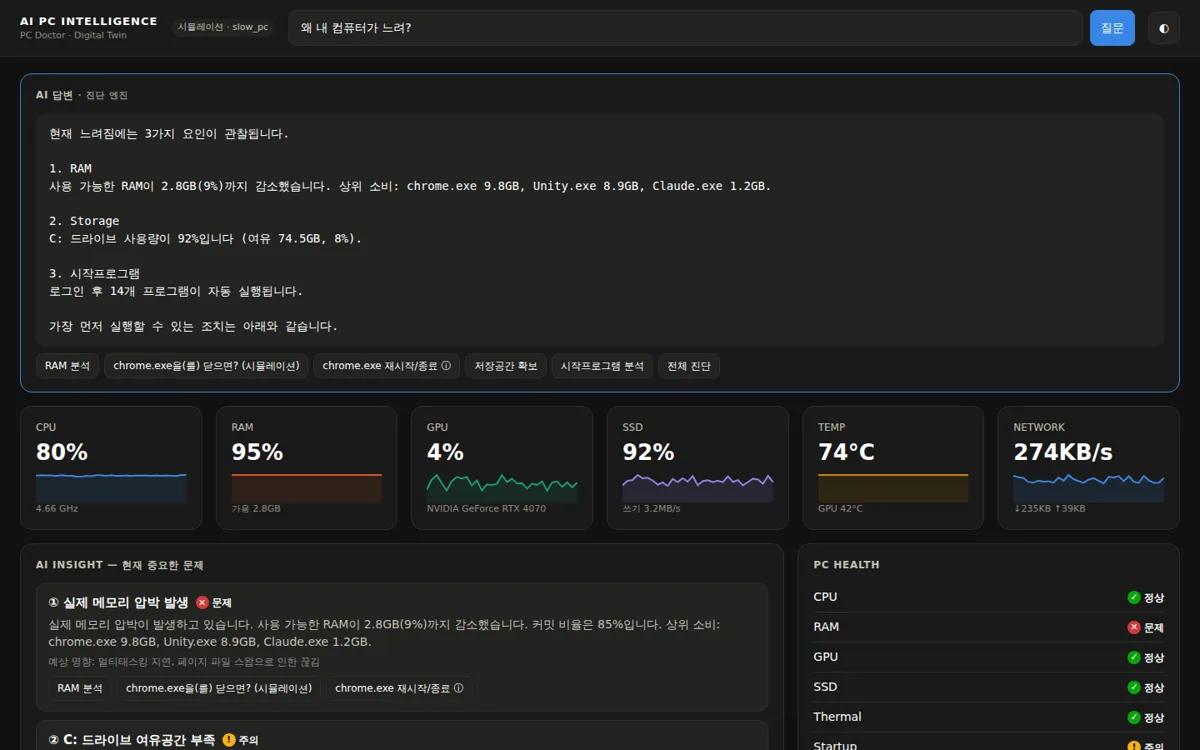
Ask “Why is my computer slow?” The AI looks at CPU, RAM, GPU, SSD and drivers together and tells you the cause, the evidence and what to do first.
Counted live since · repeat visits count once per 30 minutes
No digging through Device Manager or hunting on manufacturer sites. It finds devices without drivers, installs them, sets up the apps you need and checks that you get the performance you paid for.
Learn moreThe first launch starts in Easy mode. One screen tells you, in plain language, what is wrong and what to press.
Learn moreExpert mode shows every sensor, timeline graph and raw piece of evidence. You see not just the verdict, but the evidence behind it.
Learn moreIT staff don't have to open every PC. Standardize installs, required apps and health checks, and find the PCs with problems first, with evidence.
Learn moreCPU, caches, motherboard, memory, GPU and SSD details — plus why your clock speed dropped.
Separates harmless cache from real memory pressure and catches apps whose memory keeps growing.
When a game stutters, it tells you whether the GPU is maxed out or the CPU is holding it back.
Finds regenerable caches with a safety rating, and moves them to the Recycle Bin instead of deleting.
Links blue screens, sudden shutdowns and GPU driver resets to driver dates and temperatures.
The AI calls real diagnostic tools to answer. Every action needs your confirmation and can be undone.
Diagnosis explanations, checkups, notifications and the tray menu all come in 12 languages — and the app follows your Windows language automatically.
Buttons, gauges and alerts carry clear labels, so screen readers like Narrator and NVDA can read your PC’s status aloud.
Reads Windows’ own boot performance records to show which app, service or driver slowed startup and by how many seconds on average (e.g. Adobe CC 8.2 s × 4 boots). Turn off its auto-start with one confirmed click, and the app measures your boot time after the restart.
Checks the digital signatures and locations of auto-start programs and non-Microsoft scheduled tasks. It flags risky combinations — unsigned + AppData or temp folder + hidden + repeats every 10 minutes — and leftover entries whose file is gone. Suspicious tasks are only disabled, never deleted, after you confirm and a restore point is created, and you can undo it any time.
Counts the neighboring routers overlapping your channel and scores the interference (their network names are never stored), then recommends a quieter channel (e.g. 6 → 11) or switching to 5 GHz, with a step-by-step router guide.
Checks security, updates, storage, stability and performance at once — and shows which points were lost, why, and a button to fix each.
Measures CPU, memory and disk, and tells you when background work or heat skewed the score. It also finds why your PC got slower.
Recommends a setting only when this PC’s measurements call for it, and every change can be undone. Placebo ‘optimizations’ are filtered out.
New to PCs? A few big buttons. Power user? Every number plus a Windows toolbox on one screen.
Runs checkups and watches disk space while you’re away, and only changes things after you confirm.
A tiny monitor window stays on top while you game or work, so you can check on your PC without switching windows.
Install it and it quietly watches from the tray.
When something goes wrong, you get the cause and the impact.
Preview the result in a confirmation dialog and fix it in one click.
No fake “RAM boosters” that only change numbers. Your data stays on your PC, and exported reports automatically hide user names and IP addresses.
PC performance, PC security, and whether digital content is real. Built on one principle — show the evidence and let you decide.
useaipc.com
An AI PC doctor that explains why your PC is slow through how the numbers relate — and fixes it safely.
You are hereultarineo.com
A free security checkup with 30+ engines that finds the adware, data leaks, intrusion traces and home-network tampering antivirus misses.
Visit siteorigma.com
Digital content forensics that judges whether images, video, audio and documents were AI-made, plus provenance signatures and tampering.
Visit siteYes. Every feature is free, and the installer is code-signed so you can verify the publisher.
Instead of listing numbers, it explains cause, evidence and fix — and only suggests safe actions with a proven effect.
No. Analysis runs locally. Only when you turn on AI answers is a summary sent, with personal details masked.
Yes. The whole app — diagnosis explanations, checkups, notifications and the tray menu — works in 12 languages. It follows your Windows display language automatically, and you can switch any time in Settings.
Yes. Buttons, gauges and alerts have text labels that screen readers such as Windows Narrator and NVDA read aloud.
Microsoft and Windows components, security (antivirus) and driver items are never offered for turning off. Every change asks for your confirmation, creates a restore point first, and only disables the item — nothing is deleted — so you can undo it from the app at any time.
Install it, click the tray icon, and your first diagnosis is already done. Free forever for personal use.